This tutorial focuses on network topologies, specifically the organization of network elements into boundaries, zones and areas. The main topics covered include:
Creating and using boundaries
Creating and using zones
Creating and using areas
Additional useful methods of powfacpy for groupings (boundaries, areas, zones), e.g. merging of zones/areas, showing areas in the network graphic, checking connectivity, checking if elements are internal, getting load flow results, etc.
Getting the dispatchable units of a grouping by technology (synchronous generators, PV, wind, battery storage) and setting or scaling their power dispatch and rated power
The respective powfacpy classes for zones/areas/boundaries extend the functionality of the PowerFactory classes. Note that powfacpy also defines its own grouping class named SubSystem with even more extended functionality which is covered in the SubSystems tutorial.
First, we activate the PowerFactory project of the IEEE 39 bus system example, create a copy of a stable study case and activate it.
# If you use IPython/Jupyter:import sysimport jsonwithopen(r"..\..\settings_local.json") as settings_file: SETTINGS = json.load(settings_file)sys.path.append( SETTINGS["local path to PowerFactory application"] # e.g. r"C:\Program Files\DIgSILENT\PowerFactory 2025 SP5\Python\3.13")# Get the PF appimport powerfactoryapp = powerfactory.GetApplication()from powfacpy.base.active_project import ActiveProjectfrom powfacpy.pf_classes.protocols import PFApppf_app: PFApp = powerfactory.GetApplication()act_prj = ActiveProject(pf_app)act_prj.app.Show()act_prj.app.ActivateProject("powfacpy\\39_bus_new_england_copy_to_run_tests") # You may change the project path.study_case = act_prj.copy_single_obj("Study Cases\\2.3 Simulation Fault Bus 31 Stable", "Study Cases", new_name="Topology tutorial")study_case.Activate()act_prj.create_variation("Topology tutorial")
There are various classes to group network objects in PowerFactory including - areas (ElmArea), - zones (ElmZone), - boundaries (ElmBoundary).
Areas and zones are very similar. One of their disadvantages is that it is not possible for one network element to be part of more than one area/zone. Boundaries on the other hand are more flexible and there is no such restriction, i.e. one element can be included in more than one boundary. Note also that the zone/area classes provide a method to define a boundary (DefineBoundary) that includes their internal elements. More information can be found in the PowerFactory manual in the chapter on Grouping Objects.
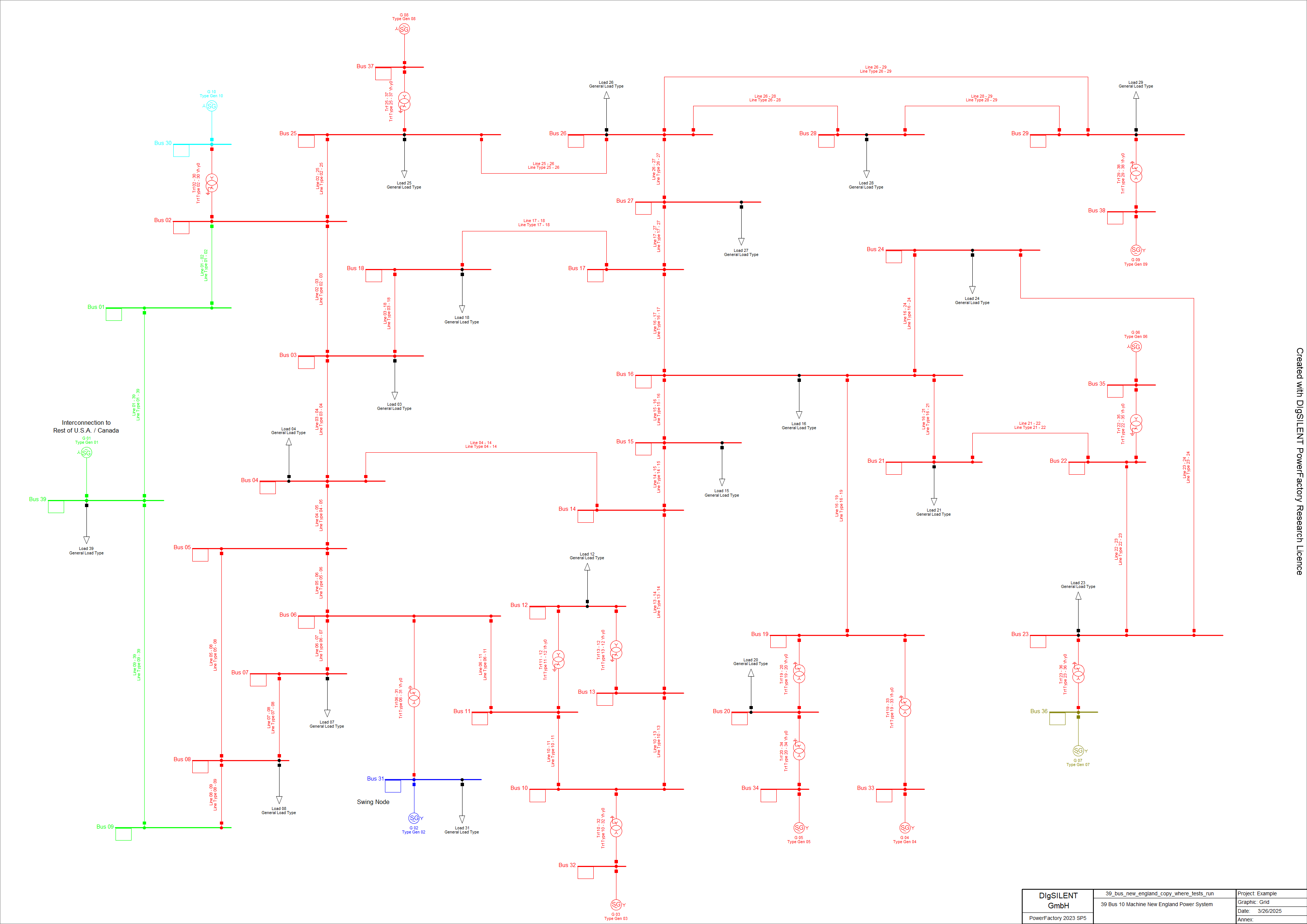
We will examine an example in which the terminals of the IEEE 39 bus system are categorized into several regions. Each terminal is assigned to a specific region. These regions have been preselected based on coherency identification, as referenced in [1]. The configuration includes one large region and several smaller regions, as detailed in the following list of elements.
We will use the Topology class of powfacpy to create the regions. The lists with terminal names in coherent_regions_terminals assigned above are iterated and the method create_boundary_using_intermediate_zone is used, which creates a boundary by creating a zone in an intermediate step (first creating a zone is a convenient way to create a boundary). The method allows to exclude elements. In the example below, all loads (ElmLod) are excluded from the boundaries.
from powfacpy.applications.topology import Topologyfrom powfacpy.pf_classes.elm.boundary import Boundarytry: app.Hide() act_prj.clear_folder(act_prj.boundaries_folder) topo = Topology() boundaries: list[Boundary] = []for n, terminals inenumerate(coherent_regions_terminals): terminal_objs = [act_prj.get_calc_relevant_obj(term +".ElmTerm")[0] for term in terminals] boundary = topo.create_boundary_using_intermediate_zone("Region "+str(n+1), terminal_objs, exclude_node_elms=lambda x: x.GetClassName() =="ElmLod", color=n+2, ) boundaries.append(Boundary(boundary))finally: app.Show()
Warning
Note that the method create_boundary_using_intermediate_zone might change existing zones in the network model if their elements are included in the boundary (because elements can only be part of one zone). To avoid this use ‘create_boundary_without_changing_initial_zones’ instead.
It is also possible to create boundaries by specifiying the terminals and branches of their borders (e.g. lines). We first create a dictionary where the keys are the terminals and the values are lists with the branch elements (actually we specify their path):
The objects of class Boundary are stored in the boundaries list in the loop above. The Boundary class of powfacpy offers some convenient methods, for example to visualize the interior of (all) boundaries in the single line diagram.
from powfacpy.applications.plots import Plotsfrom os import getcwdpf_plt = Plots(app)pf_plt.set_active_graphics_page("Grid")boundary_1 = boundaries[0]boundary_1.show_boundary_interior_regions_in_network_graphic()
The regions are now illustrated in the single line diagram. Apparently, loads are excluded from the interior of the boundaries.
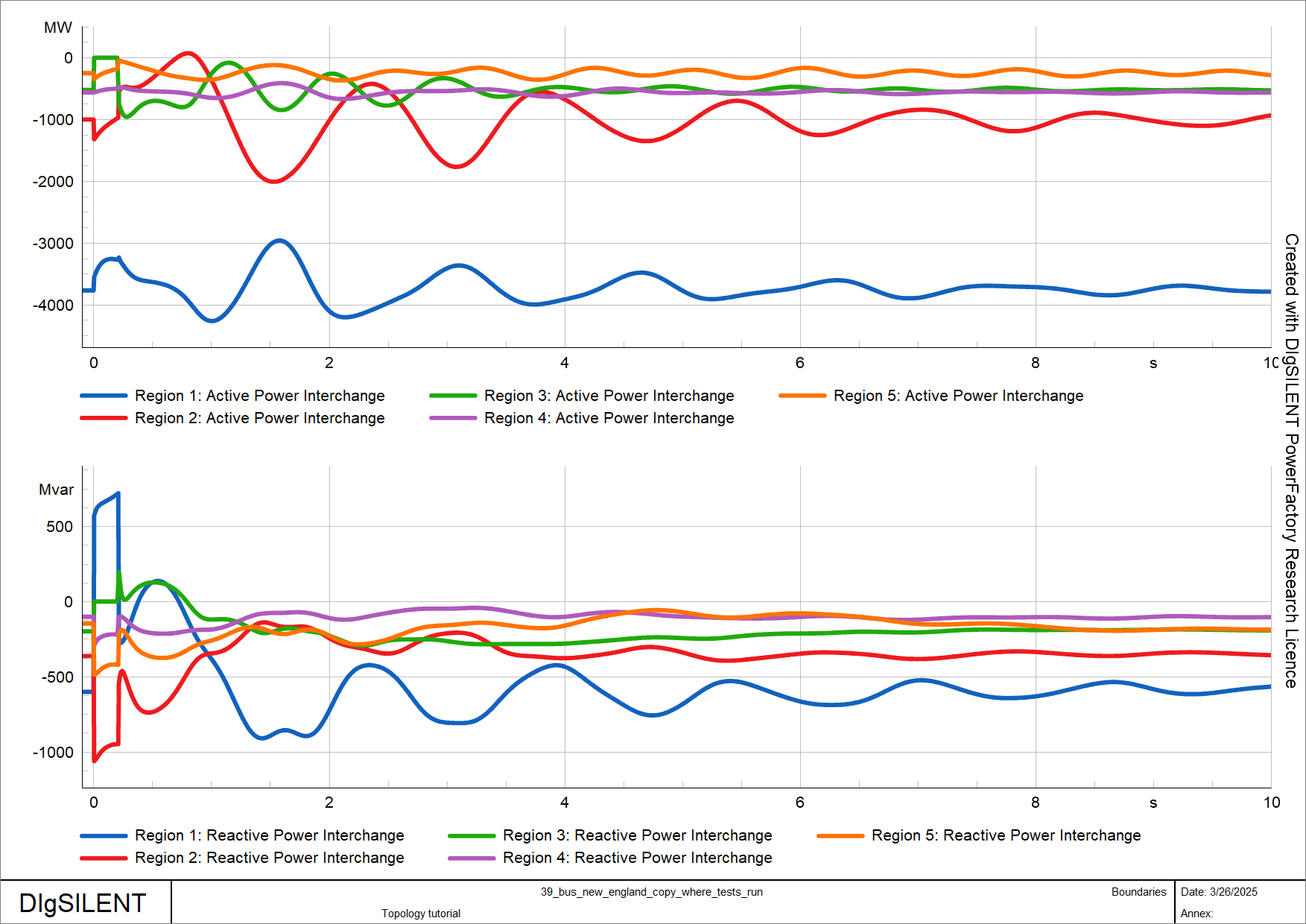
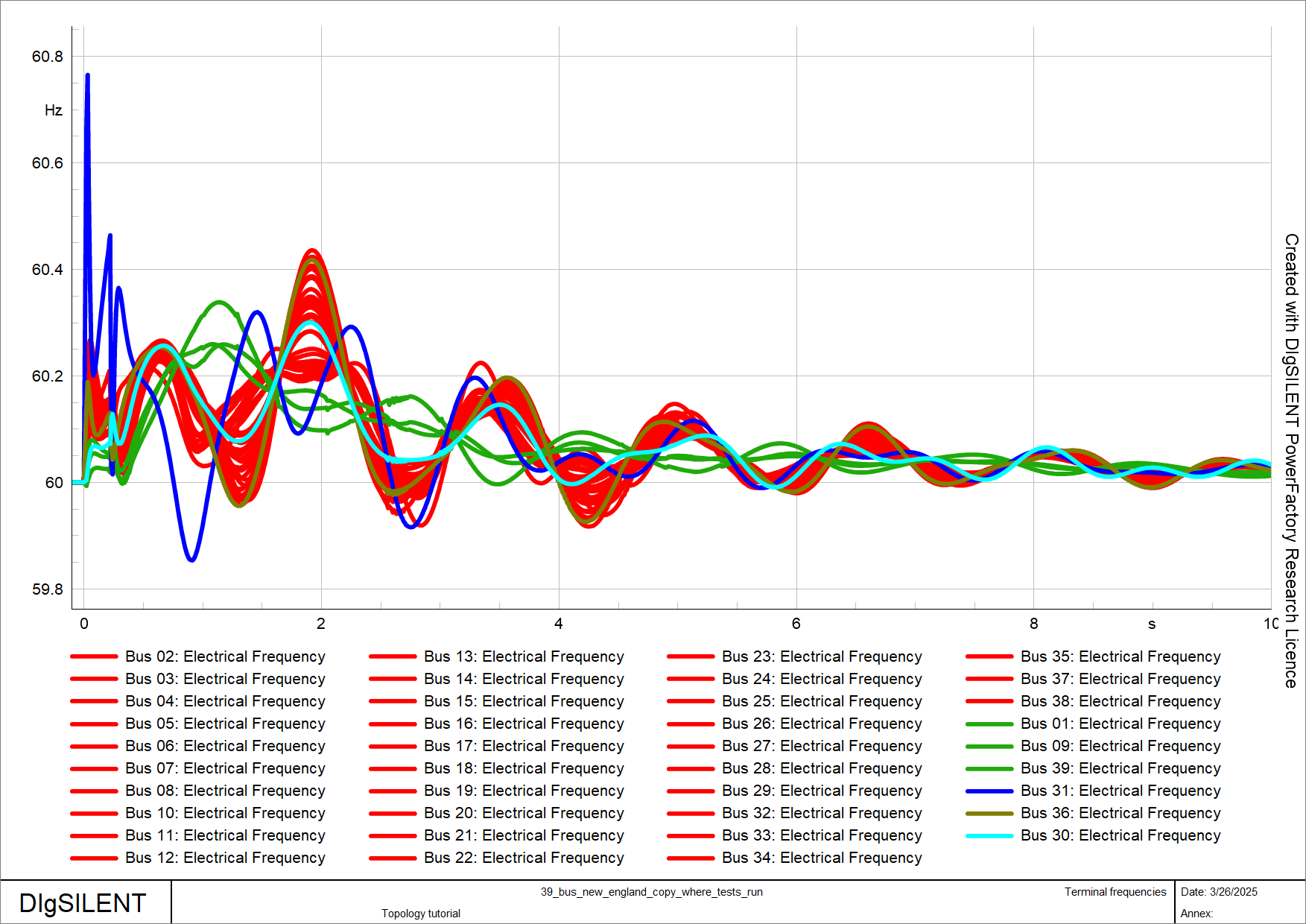
We will now create plots showing the active and reactive power exchange of the boundaries as well as the frequencies of the terminals.
from powfacpy.result_variables import ResVarRMS_BAL = ResVar.RMS_Baltry: app.Hide() pf_plt.clear_plot_pages()for n, boundary inenumerate(boundaries): pf_plt.set_active_plot("Active power", "Boundaries") pf_plt.plot(boundary.obj, boundary.get_P_exchange_res_var_rms_bal()) pf_plt.set_active_plot("Reactive power", "Boundaries") pf_plt.plot(boundary.obj, boundary.get_Q_exchange_res_var_rms_bal()) pf_plt.set_active_plot("Frequency", "Terminal frequencies")for term in coherent_regions_terminals[n]: terminal_obj = act_prj.get_calc_relevant_obj(term +".ElmTerm")[0] pf_plt.plot(terminal_obj, RMS_BAL.ElmTerm.m_fehz.value, color=n+2)finally: app.Show()
Executing an RMS simulation gives the following results. As shown in the frequency plot, the frequencies at coherent terminals oscillate in phase.
from powfacpy.applications.dynamic_simulation import DynamicSimulationpfds = DynamicSimulation(app)pfds.initialize_and_run_sim(param_simulation={"tstop": 10})
power-exchange-regions
frequencies-coherent-terminals
2 Zones
The topology class also allows to create zones. For example, a zone for the first region in coherent_regions_terminals can be created using terminals: :
from powfacpy.pf_classes.elm.zone import Zonetry: app.Hide() terminal_objs_of_region_1 = [act_prj.get_calc_relevant_obj(term+".ElmTerm")[0] for term in coherent_regions_terminals[0]] zone_obj_1 = topo.create_zone("Region 1", terminal_objs_of_region_1)finally: app.Show()
You can also create a zone based on a boundary:
zone_obj_2 = boundaries[1].create_zone()
The Zone class of powfacpy can then be used to display zones in the single line diagram.
The ElmArea class of PowerFactory is very similar to the ElmZone class and so is the Area class of powfacpy compared to the Zone class.
from powfacpy.pf_classes.elm.area import Areaarea_obj = topo.create_area("Region 1", terminal_objs_of_region_1)area_1 = Area(area_obj)area_1.show_areas_in_network_graphic()
4 Common Methods of Grouping Classes
Classes of powfacpy that group objects (like Boundary, Zone and Area) have common methods which are defined in the abstract base class GroupingBase. Here are some examples using the zone and boundary instances created above.
try: app.Hide()# All internal elements elms = boundary_1.get_all_internal_elms() elms = zone_1.get_all_internal_elms()# Get internal elements with condition elms = boundary_1.get_internal_elms(condition=lambda x: x.GetClassName()=="ElmTerm"and x.uknom >300) elms = zone_1.get_internal_elms(condition=lambda x: x.GetClassName()=="ElmTerm"and x.uknom >300)# Get internal elements of class elms = boundary_1.get_internal_elms_of_class("ElmLne") elms = zone_1.get_internal_elms_of_class("ElmLne")# Check if element is internal is_internal = boundary_1.is_internal_elm(elms[0]) is_internal = zone_1.is_internal_elm(elms[0])print(is_internal)# Check if list of elements (which must be of same class) are internal is_internal_list = boundary_1.are_internal_elms_with_same_class(elms) is_internal_list = zone_1.are_internal_elms_with_same_class(elms)print(is_internal_list)# Get results variable for active power exchange in RMS simulations p_res_var = boundary_1.get_P_exchange_res_var_rms_bal() p_res_var = zone_1.get_P_exchange_res_var_rms_bal()# Load flow statefinally: app.Show()
True
True
5 Common Methods of Zones and Areas
ElmZone and ElmArea classes are very similar in their functionality in PowerFactory. Therefore, the Zone and Area classes of powfacpy also have some common methods which are defined in the abstract base class ZoneAreaBase. Here are some examples using the zone and area instances created above.
try: app.Hide()# Load flow results must be present. act_prj.execute_load_flow()# load flow methods from AreaZoneBaseprint("Zone total load in MVA:", zone_1.load_flow_total_power_loads_in_MVA())print("Area total load in MVA:", area_1.load_flow_total_power_loads_in_MVA())print("Zone total generation in MVA:", zone_1.load_flow_total_power_generation_in_MVA())print("Area total generation in MVA:", area_1.load_flow_total_power_generation_in_MVA())# topologyprint("Are zones neighbors?", zone_1.is_neighbor(zone_2))print("All neighbors:", zone_1.get_neighbors())finally: app.Show()
Zone total load in MVA: (4983.900009155273+1154.3000016212463j)
Area total load in MVA: (4983.900009155273+1154.3000016212463j)
Zone total generation in MVA: (3810.0000000401697+808.7073761430935j)
Area total generation in MVA: (3810.0000000401697+808.7073761430935j)
Are zones neighbors? True
All neighbors: [<powerfactory.DataObject <l1>\seberlein.IntUser\powfacpy\39_bus_new_england_copy_to_run_tests.IntPrj\Network Model.IntPrjfolder\Network Data.IntPrjfolder\Zones.IntZone\Region 2.ElmZone</l1>>]
There is also a method to merge two zones/areas. The method takes care of the necessary changes in the network model, i.e. it changes the area/zone assignment of the terminals of the zone/area to merge and then deletes the merged zone/area. The method returns the merged ElmZone/ElmArea.
GroupingBase also gives quick access to the dispatchable units inside a grouping, sorted by technology. The category is taken from the PowerFactory plant-category codeaCategory (e.g. "wgen", "pv", "stor"), which is stable across PowerFactory’s display language - unlike the localised cCategory shown in the GUI ("Wind", "Photovoltaic", …).
method
returns
get_internal_sg()
synchronous generators (ElmSym with i_mot == 0)
get_internal_pv()
every ElmPvsys plus every ElmGenstat of category "pv"
get_internal_wind()
every ElmGenstat of category "wgen"
get_internal_bess()
every ElmGenstat of category "stor" with a battery sub-category
The IEEE 39 bus system has only synchronous machines, so we use zone_1 (still valid after the merge above) for those:
print(len(zone_1.get_internal_sg()), "synchronous machines in zone 1")
7 synchronous machines in zone 1
6.1 Unit groups
The properties zone.sg, zone.pv, zone.wind and zone.bess wrap the corresponding list in a UnitCollection. A UnitCollection still behaves like the list of raw PowerFactory objects (you can iterate and index it), but it adds aggregate operations. Its totals - and the distribute option below - account for parallel units (ngnum).
We do the following experiments in a separate variation so they can be rolled back out afterwards.
from powfacpy.pf_classes.elm.unit_collection import UnitCollectiondispatch_variation = act_prj.create_variation("Dispatch examples")machines: UnitCollection = zone_1.sgprint("count: ", len(machines))print("total active power dispatch [MW]: ", round(machines.total_active_power))print("total reactive power [Mvar]: ", round(machines.total_reactive_power))print("total rated apparent power [MVA]: ", round(machines.total_rated_power))
count:                             7
total active power dispatch [MW]:  4810
total reactive power [Mvar]:       0
total rated apparent power [MVA]:  14700
Set or scale the dispatch of the whole group:
# the same setpoint on every unitmachines.set_power_dispatch(400, 50) # 400 MW, 50 Mvar each# interpret the argument as a group total and split it equallymachines.set_power_dispatch(4000, distribute=True)# scale the present dispatch (active and reactive, so the power factor is kept)machines.scale_power_dispatch(0.9)# re-dispatch to a group total, shared out proportionally to ...machines.scale_to_total(4200, base="current") # ... the present active powermachines.scale_to_total(4200, base="rated") # ... the rated apparent powerprint("total after re-dispatch [MW]:", round(machines.total_active_power))
total after re-dispatch [MW]: 4200
By default the power-setting methods widen the operational limits (Pmax_uc / Pmin_uc and cQ_min / cQ_max) when a setpoint falls outside them; they never narrow a limit. Pass adapt_limits=False to leave the limits untouched. A reactive-power setpoint also switches the unit’s input mode (mode_inp) to "PQ", a power factor switches it to "PC".
6.2 Individual units
Each unit class - SynchronousMachine (ElmSym), StaticGenerator (ElmGenstat) and PVSystem (ElmPvsys) - has the same set_power_dispatch for a single element (active_power and reactive_power are per parallel unit here):
from powfacpy.pf_classes.elm.sym import SynchronousMachinemachine = SynchronousMachine(zone_1.get_internal_sg()[0])machine.set_power_dispatch(500) # active power onlymachine.set_power_dispatch(500, 120) # ... and reactive powermachine.set_power_dispatch(500, power_factor=0.95, capacitive=True) # ... or a power factorprint(machine.loc_name, "- rated apparent power [MVA]:", machine.rated_apparent_power)
G 01 - rated apparent power [MVA]: 10000.0
6.3 Rated power
set_rated_power / scale_rated_power change the units’ nominal apparent power; pass scale_setpoints=True to move the dispatch with it.
Warning
For ElmSym the rating lives on the shared machine type (TypSym). If a type is used by more than one machine, set_rated_power / scale_rated_power raise rather than silently re-rating the others - pass copy_shared_type=True to give each machine its own copy of the type first. The machines of the IEEE 39 bus system each have their own type, so it is not needed here.
machines.scale_rated_power(1.1, scale_setpoints=True)print("total rated power now [MVA]:", round(machines.total_rated_power))dispatch_variation.Deactivate() # roll the experiments back out
total rated power now [MVA]: 16170
0
6.4 A grouping with converter-based units
The 39_bus_with_der project from the template models tutorial has wind (ElmGenstat) and PV (ElmPvsys) units. We switch to it and look at its pre-defined Zone 2 (this is the last step of the tutorial, so we do not switch back).
synchronous generators: 4
wind units (ElmGenstat): 10
PV units (ElmPvsys):     14
battery storage units:   []
installed wind capacity [MVA]: 1500
der_variation = act_prj.create_variation("DER dispatch example")# curtail the zone's wind to 60 % of its installed capacityder_zone.wind.set_power_dispatch(0.6* der_zone.wind.total_rated_power, distribute=True)print("wind active power now [MW]:", round(der_zone.wind.total_active_power))der_variation.Deactivate()
A. M. Khalil and R. Iravani, “A Dynamic Coherency Identification Method Based on Frequency Deviation Signals,”IEEE Transactions on Power Systems, vol. 31, no. 3, pp. 1779–1787, May 2016, doi: 10.1109/TPWRS.2015.2452212.