import sys
import json

with open(r"..\..\settings_local.json") as settings_file:
    SETTINGS = json.load(settings_file)

sys.path.append(SETTINGS["local path to PowerFactory application"]) # e.g. r"C:\Program Files\DIgSILENT\PowerFactory 2025 SP5\Python\3.13"

import powerfactory

app = powerfactory.GetApplication()
app.Show()
app.ActivateProject(r"powfacpy\39_bus_with_der_copy_to_run_tests")

from powfacpy.applications.digsilent_library import DigsilentLibrary

lib = DigsilentLibrary(app)The Global DIgSILENT Library
The global DIgSILENT library (app.GetGlobalLibrary()) holds the templates, equipment types, dynamic models and reports that ship with PowerFactory. Navigating it from a script is awkward because the folder names shown in the GUI are not the names the Python API expects. In the GUI you see
Templates \ Grid-forming Converters \ WECC REGFM_A1 Droop Inverter - Storagebut GetContents("Grid-forming Converters") returns an empty list - the folder’s loc_name is actually TemplGfc, and the path the API needs is
Templ \ TemplGfc \ WECC REGFM_A1 Droop Inverter - StorageThis only affects the built-in system folders of the global library. Folders and objects in your user account (and the templates themselves) already have the name you see in the GUI, so there the Python API works as expected and you can access objects as described in the Getting Started tutorial.
powfacpy.applications.digsilent_library.DigsilentLibrary bridges the gap: it reads PowerFactory’s own localisation database from the installation folder (<install>\localisation\en-GB\data.db) to translate the coded folder names, so you can address library objects by the path shown in the GUI.
We first activate a PowerFactory project and create a DigsilentLibrary instance:
1 Resolving GUI paths
get_object walks the global library and matches each path segment against the child objects’ displayed names (and, as a fallback, their literal loc_name). That way you can use the GUI-style path as presented in the Data Manager of PowerFactory. "\\" and "/" both work as separators.
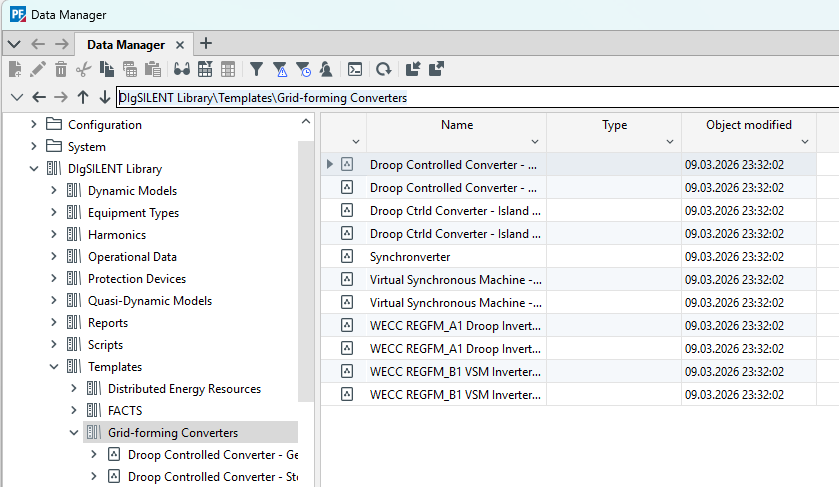
folder = lib.get_folder(r"Templates\Grid-forming Converters")
folder, folder.loc_name, folder.GetFullName()
(<powerfactory.DataObject <l1>\Lib.IntLibrary\Templ\TemplGfc</l1>>,
'TemplGfc',
'\\Lib.IntLibrary\\Templ\\TemplGfc')template = lib.get_template(
r"Templates\Grid-forming Converters\WECC REGFM_A1 Droop Inverter - Storage"
)
template, template.GetClassName()(<powerfactory.DataObject <l1>\Lib.IntLibrary\Templ\TemplGfc\WECC REGFM_A1 Droop Inverter - Storage.IntTemplate</l1>>,
'IntTemplate')get_folder / get_template are get_object with a class check; use get_object for anything else, and error_if_non_existent=False to get None instead of an exception:
lib.get_object(r"Templates\Does Not Exist", error_if_non_existent=False)2 Listing and translating
list_contents returns a {displayed_name: object} dictionary of a folder’s children; list_templates is the same, restricted to IntTemplates:
lib.list_templates(r"Templates\Grid-forming Converters"){'WECC REGFM_A1 Droop Inverter - Gen': <powerfactory.DataObject <l1>\Lib.IntLibrary\Templ\TemplGfc\WECC REGFM_A1 Droop Inverter - Gen.IntTemplate</l1>>,
'WECC REGFM_A1 Droop Inverter - Storage': <powerfactory.DataObject <l1>\Lib.IntLibrary\Templ\TemplGfc\WECC REGFM_A1 Droop Inverter - Storage.IntTemplate</l1>>,
'Droop Controlled Converter - Generation': <powerfactory.DataObject <l1>\Lib.IntLibrary\Templ\TemplGfc\Droop Controlled Converter - Generation.IntTemplate</l1>>,
'Droop Controlled Converter - Storage': <powerfactory.DataObject <l1>\Lib.IntLibrary\Templ\TemplGfc\Droop Controlled Converter - Storage.IntTemplate</l1>>,
'Droop Ctrld Converter - Island Grid Gen': <powerfactory.DataObject <l1>\Lib.IntLibrary\Templ\TemplGfc\Droop Ctrld Converter - Island Grid Gen.IntTemplate</l1>>,
'Droop Ctrld Converter - Island Grid Stor': <powerfactory.DataObject <l1>\Lib.IntLibrary\Templ\TemplGfc\Droop Ctrld Converter - Island Grid Stor.IntTemplate</l1>>,
'Synchronverter': <powerfactory.DataObject <l1>\Lib.IntLibrary\Templ\TemplGfc\Synchronverter.IntTemplate</l1>>,
'Virtual Synchronous Machine - Generation': <powerfactory.DataObject <l1>\Lib.IntLibrary\Templ\TemplGfc\Virtual Synchronous Machine - Generation.IntTemplate</l1>>,
'Virtual Synchronous Machine - Storage': <powerfactory.DataObject <l1>\Lib.IntLibrary\Templ\TemplGfc\Virtual Synchronous Machine - Storage.IntTemplate</l1>>,
'WECC REGFM_B1 VSM Inverter - Generation': <powerfactory.DataObject <l1>\Lib.IntLibrary\Templ\TemplGfc\WECC REGFM_B1 VSM Inverter - Generation.IntTemplate</l1>>,
'WECC REGFM_B1 VSM Inverter - Storage': <powerfactory.DataObject <l1>\Lib.IntLibrary\Templ\TemplGfc\WECC REGFM_B1 VSM Inverter - Storage.IntTemplate</l1>>}# every child of the folder, not just the templates
list(lib.list_contents("Templates").keys())['FACTS',
'Wind Turbines',
'Storage Systems',
'Photovoltaic',
'Variable Speed Drives',
'Plant Controllers',
'Distributed Energy Resources',
'Steam/Gas/Diesel Power Plants',
'Loads',
'Grid-forming Converters',
'HVDC']The dictionary keys are the names shown in the GUI. gui_name performs that single-name translation and accepts either a coded loc_name or a folder object:
lib.gui_name("TemplGfc"), lib.gui_name(folder)('Grid-forming Converters', 'Grid-forming Converters')Only the built-in system folders carry a coded name that needs translating. Anything that already has its GUI name - folders you created yourself, and the templates themselves - is returned unchanged, so it is safe to call gui_name on a name that is already “real”:
lib.gui_name("Grid-forming Converters"), lib.gui_name(template.loc_name)('Grid-forming Converters', 'WECC REGFM_A1 Droop Inverter - Storage')The translations live in folder_name_translations, a {loc_name: gui_name} dictionary read once (and cached) from PowerFactory’s localisation database at <install>\localisation\en-GB\data.db:
{k: lib.folder_name_translations[k] for k in ["Templ", "TemplGfc", "TemplPv", "TemplHvdc"]}{'Templ': 'Templates',
'TemplGfc': 'Grid-forming Converters',
'TemplPv': 'Photovoltaic',
'TemplHvdc': 'HVDC'}gui_path is the reverse of get_object - the full GUI-style path of any library object:
lib.gui_path(template)'Templates\\Grid-forming Converters\\WECC REGFM_A1 Droop Inverter - Storage'3 Checking the name table against your PowerFactory version
The translations come from a private PowerFactory file, so in principle they could drift between versions. unmapped_system_folders walks the live library and reports every system folder (iopt_sys == 1) below a given branch whose loc_name has no entry in the name table:
lib.unmapped_system_folders() # within the 'Templates' branch by default[]An empty list means the name table and this PowerFactory installation agree, and every folder in that branch can be reached by its GUI name. A non-empty list is not a hard failure - navigation still works for those folders through their literal loc_name - but gui_name and gui_path will keep showing the coded name until the table is extended (either by a PowerFactory update or by adding an entry to _FALLBACK_FOLDER_NAMES).
The check deliberately skips folders whose loc_name contains a space: a few vendor sub-libraries such as Templates\HVDC\Hitachi Energy are marked as system folders but already carry a human-readable name, and PowerFactory’s coded keys never contain spaces.