Isolated Testing of Dynamic Model Blocks (DSL/Modelica)

Before wiring a dynamic model block - a DSL block definition (BlkDef) or a compiled Modelica model type (TypMdl) - into a network, it pays to exercise it in isolation first: drive its inputs with a defined time profile, run a standalone RMS simulation, and inspect the response, independently of any grid, load or other model it will eventually be connected to. powfacpy.applications.frame_test and powfacpy.applications.modelica provide the testers for this; this tutorial shows both ways to drive the inputs:

Both return the monitored signals as a pandas.DataFrame.

import sys
import json
import numpy as np
import pandas as pd

with open(r"..\..\settings_local.json") as settings_file:
    SETTINGS = json.load(settings_file)

sys.path.append(SETTINGS["local path to PowerFactory application"])

import powerfactory

app = powerfactory.GetApplication()
app.Show()
app.ActivateProject(r"powfacpy\control_block_testing")
0

1 Testing inside the frame

The shipped BlockDefinitionTesting composite frame (project control_block_testing) wires three slots: Input - a DSL lookup-table signal generator that linearly interpolates between given breakpoints (lapprox) - the device under test (BlockDefinitionTested), and Sink, which terminates the outputs. BlockDefinitionFrameTest and ModelicaModelFrameTest place a BlkDef or TypMdl in the device slot and wire it up; set_input_signals({input_name: {time: value, ...}}) defines every input as piecewise-linear breakpoints, and run(monitor, tstop) runs the RMS simulation and returns the monitored signals.

1.1 A DSL block definition (BlkDef)

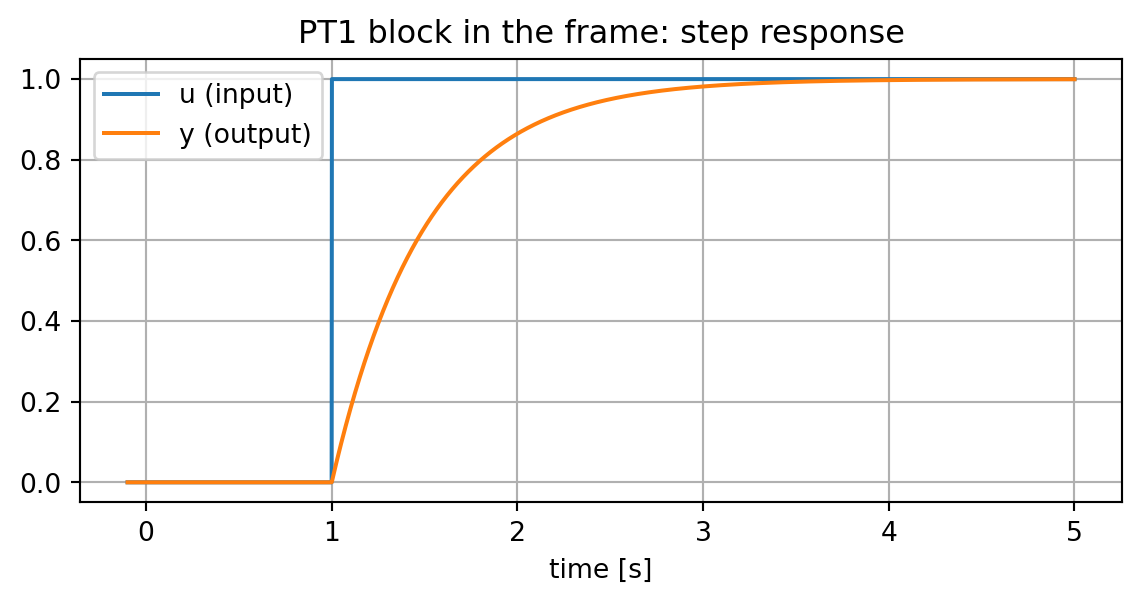
As a minimal example, take a first-order lag (PT1): y' = (u - x)/T, created here directly from Python instead of the GUI.

from powfacpy.applications.frame_test import BlockDefinitionFrameTest

COMPOSITE_MODEL = r"Network Model\Network Data\Grid\BlockDefinitionTesting"

try:
    app.Hide()
    dsl_test = BlockDefinitionFrameTest(app)
    dsl_test.act_prj.activate_study_case(r"Study Cases\Study Case")

    dyn_models = app.GetProjectFolder("blk")
    for old in dyn_models.GetContents("PT1_demo.BlkDef"):
        old.Delete()
    pt1 = dyn_models.CreateObject("BlkDef", "PT1_demo")
    pt1.SetAttribute("sInput", ["u"])
    pt1.SetAttribute("sOutput", ["y"])
    pt1.SetAttribute("sStates", ["x"])
    pt1.SetAttribute("sParams", ["T"])
    pt1.SetAttribute("sAddEquat", ["inc(x) = u", "x. = (u - x)/T", "y = x"])

    dsl_test.build(pt1, COMPOSITE_MODEL, parameters={"T": 0.5}, name="pt1_frame")
    dsl_test.set_input_signals({"u": {0.0: 0.0, 1.0 - 1e-6: 0.0, 1.0: 1.0, 5.0: 1.0}})
    pt1_result = dsl_test.run(["u", "y"], tstop=5.0)
finally:
    app.Show()

pt1_result.iloc[::50]
u y
time
-1.000000e-01 0.0 0.000000
-5.000000e-02 0.0 0.000000
7.632783e-17 0.0 0.000000
5.000000e-02 0.0 0.000000
1.000000e-01 0.0 0.000000
... ... ...
4.799167e+00 1.0 0.999499
4.849167e+00 1.0 0.999547
4.899167e+00 1.0 0.999590
4.949167e+00 1.0 0.999629
4.999167e+00 1.0 0.999664

103 rows × 2 columns

fig, ax = plt.subplots(figsize=(7, 3))
ax.plot(pt1_result.index, pt1_result["u"], label="u (input)")
ax.plot(pt1_result.index, pt1_result["y"], label="y (output)")
ax.set_xlabel("time [s]")
ax.legend()
ax.set_title("PT1 block in the frame: step response")
Text(0.5, 1.0, 'PT1 block in the frame: step response')

1.2 A Modelica model type (TypMdl)

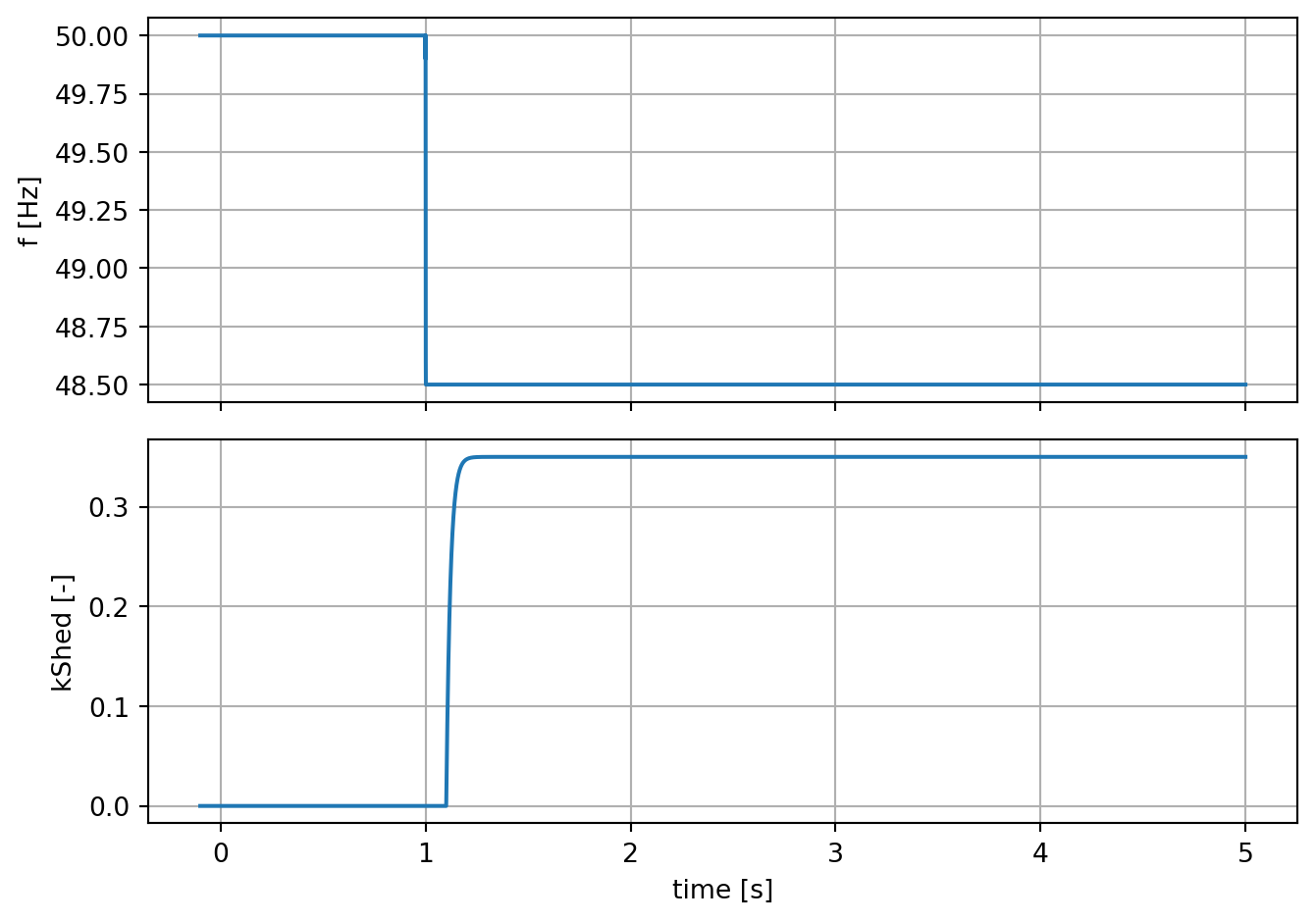
The Modelica model is the load-shedding controller from the Importing Modelica Models tutorial - here only its input f (frequency) and output kShed (shed fraction) matter, nothing about its internal logic.

from powfacpy.applications.modelica import ModelicaModelSpec, ModelicaModelFrameTest

spec = ModelicaModelSpec.from_modelica(r"..\..\pf_models\modelica\LoadSheddingController.mo")

try:
    app.Hide()
    frame_test = ModelicaModelFrameTest(app)
    frame_test.build(spec, COMPOSITE_MODEL, name="lsc_frame")
    frame_test.set_input_signals({
        "f":     {0.0: 50.0, 1.0 - 1e-6: 50.0, 1.0: 48.5, 5.0: 48.5},
        "pLoad": {0.0: 100.0, 5.0: 100.0},
        "qLoad": {0.0: 20.0, 5.0: 20.0},
    })
    frame_result = frame_test.run(["f", "kShed"], tstop=5.0)
finally:
    app.Show()

frame_result.iloc[::50]
f kShed
time
-1.000000e-01 50.0 0.00
-5.000000e-02 50.0 0.00
7.632783e-17 50.0 0.00
5.000000e-02 50.0 0.00
1.000000e-01 50.0 0.00
... ... ...
4.787527e+00 48.5 0.35
4.837527e+00 48.5 0.35
4.887527e+00 48.5 0.35
4.937527e+00 48.5 0.35
4.987527e+00 48.5 0.35

103 rows × 2 columns

fig, ax = plt.subplots(2, 1, figsize=(7, 5), sharex=True)
ax[0].plot(frame_result.index, frame_result["f"])
ax[0].set_ylabel("f [Hz]")
ax[1].plot(frame_result.index, frame_result["kShed"])
ax[1].set_ylabel("kShed [-]")
ax[1].set_xlabel("time [s]")
fig.tight_layout()

2 Testing a Modelica model directly, without the frame

ModelicaModelTest runs a compiled Modelica model type on its own, as a standalone ElmMdl with no frame and no slots. Its inputs are stepped with parameter events (EvtParam) instead of the frame’s lookup table, so only step changes are possible - a real ramp cannot be represented this way. It needs nothing beyond a grid and a study case, though. Reusing the same frequency step as above lets us check that the two testers agree:

from powfacpy.applications.modelica import ModelicaModelTest

try:
    app.Hide()
    direct_test = ModelicaModelTest(app)
    direct_test.build(
        spec,
        input_start_values={"f": 50.0, "pLoad": 100.0, "qLoad": 20.0},
        name="lsc_direct",
    )
    direct_test.set_input_events({"f": {1.0: 48.5}})
    direct_result = direct_test.run(["f", "kShed"], tstop=5.0)
finally:
    app.Show()

direct_result.iloc[::50]
f kShed
time
-1.000000e-01 50.0 0.00
-5.000000e-02 50.0 0.00
7.632783e-17 50.0 0.00
5.000000e-02 50.0 0.00
1.000000e-01 50.0 0.00
... ... ...
4.795976e+00 48.5 0.35
4.845976e+00 48.5 0.35
4.895976e+00 48.5 0.35
4.945976e+00 48.5 0.35
4.995976e+00 48.5 0.35

103 rows × 2 columns

2.1 Comparing the two

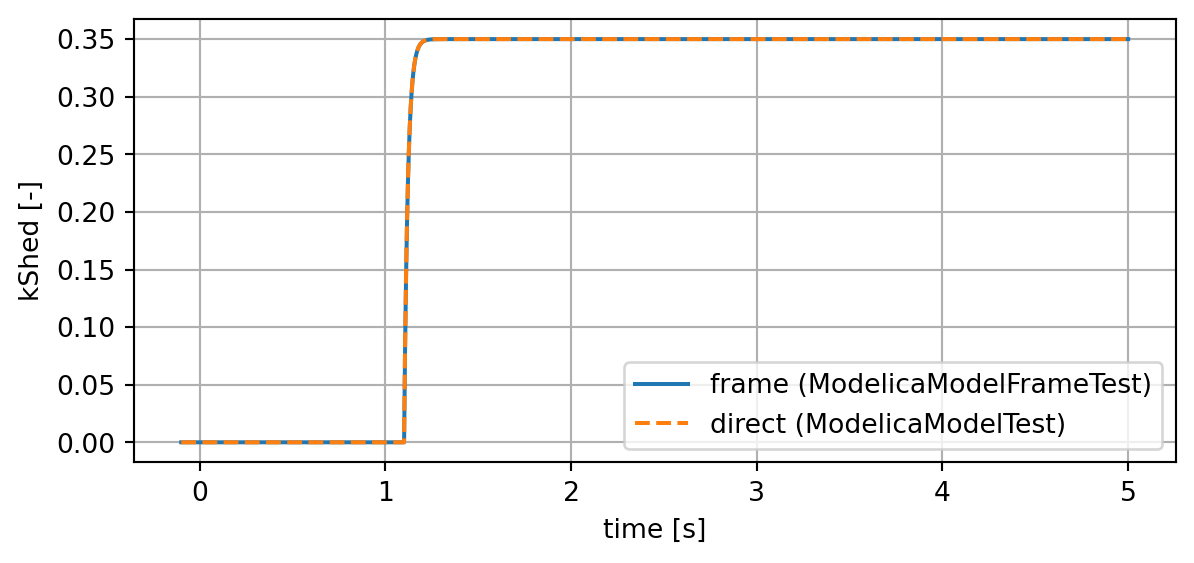
Overlaying kShed from both testers shows they agree once the response has settled:

fig, ax = plt.subplots(figsize=(7, 3))
ax.plot(frame_result.index, frame_result["kShed"], label="frame (ModelicaModelFrameTest)")
ax.plot(direct_result.index, direct_result["kShed"], "--", label="direct (ModelicaModelTest)")
ax.set_xlabel("time [s]")
ax.set_ylabel("kShed [-]")
ax.legend()

def at(df, t, col):
    return float(df[col].iloc[df.index.get_indexer([t], method="nearest")[0]])

frame_val = at(frame_result, 3.0, "kShed")
direct_val = at(direct_result, 3.0, "kShed")
assert np.isclose(frame_val, direct_val, atol=1e-3)
print(f"kShed at t=3s -  frame: {frame_val:.3f}   direct: {direct_val:.3f}")
kShed at t=3s -  frame: 0.350   direct: 0.350

Use ModelicaModelFrameTest (or BlockDefinitionFrameTest for a BlkDef) whenever a check needs a real ramp or anything rate-sensitive (e.g. a RoCoF stage); otherwise ModelicaModelTest is the simpler setup, needing only a grid and a study case.
Back to top